Tracking Drones with Remote IDs - Become Aware of Drones with Droneaware
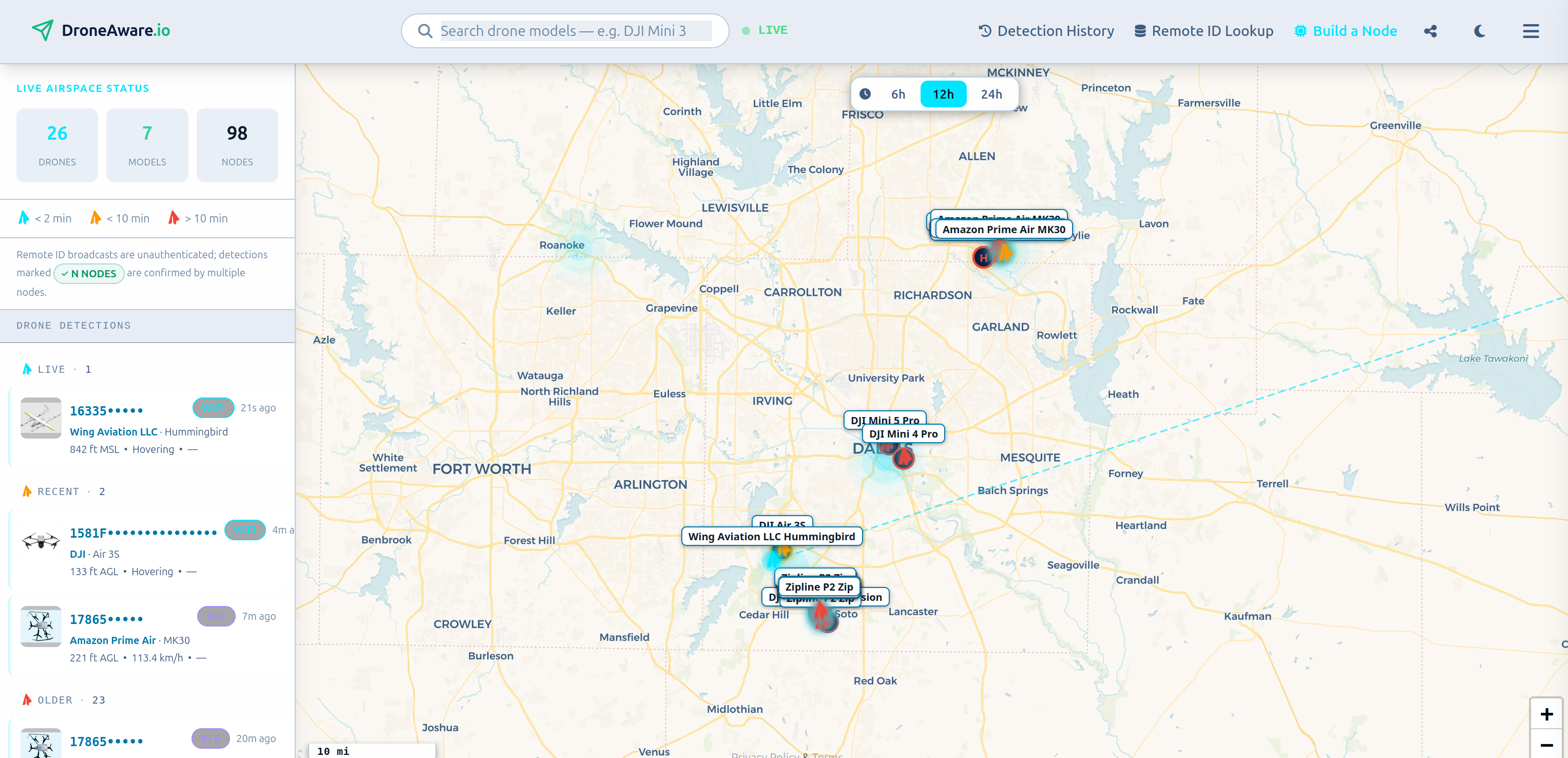
The next setup for tracking Remote IDs I want to take a dive into is droneaware. Droneaware is designed to be more of an “ADSB feeder, but for drones” than a standalone device like Sky-Spy. Its node setups use a raspberry pi and off-the-shelf wifi and bluetooth dongles, with a couple scripts that parse any scanned results, and feed them to both a local webserver and the shared droneaware live map, aggregating everyone’s data.
This is a part of my series on remote ID
For more posts on this, see below
- Tracking Drones with Remote IDs
- Tracking Drones with Remote IDs - Panicking with the Colonel
- Tracking Drones with Remote IDs - Become Aware of Drones with Droneaware (You are Here)
NOTE They’re pretty active with development, so some of my research may be moot soon. BUT if you know how and where to look for this info now, you’ll be able to take a look at the latest code and compare!
Overview - Functionality and Code Review
NOTE want to follow along? The code is at https://github.com/fduflyer/DroneAware-Node-Releases
BLE 4 and 5
For BLE, we first check if the hardware can handle 4 and 5, then look at the code. The dongle I’m currently using is the Parani-UD100, which only supports bluetooth 4.0, so it it doesn’t support the BLE 5 extended advertising. However we can look at the code and configuration to see if I could upgrade my dongle and then get BLE 5 as well.
Droneaware uses Bleak for scanning, which on linux, uses BlueZ as the backend. If you’ve used BlueZ on linux for things, then you know… poking around here gets confusing fast.
Bleak talks with BlueZ via the d-bus, an inter-process communication program on linux. From Bleak’s github, you can see an issue with telling if an advertising packet is extended or not. Basically, Bleak doesn’t clarify if an advertisement is extended or not, BUT, it’s talking with BlueZ. So then the question is: does BlueZ support BLE 5 extended advertising? And after digging into this for a while, the answer seems to be: probably.
Which is an annoying answer to have.
The current BlueZ website says it has “support for Core Specification features up to 6.0”, so that should include extended advertising. But if you download the code and do some grepping around https://github.com/bluez/bluez, a lot of places that you would think should have support for extended advertising (e.g. le_adv_report_evt that btmon uses to display HCI events), there isn’t an extra line for extended advertising.
But at some point I realized that I’d been once again nerdsniped to learn about the innards of BLE implementation on linux (If I had a nickel…). I’m going to put a pin on that research and draw a conclusion for droneaware functionality: It should support extended advertising if the BLE dongle you buy supports it. But you’ll probably want to do some testing to be sure.
5G and 2.4G Wifi
Next up, Wifi!
If the wifi dongle has support for 5G, and if you have two wifi dongles attached, droneaware will actually set one to 5G exclusively, and the other to 2.4G, which is pretty neat! Droneaware also supports just a single dongle with only 2.4, or a dongle that supports both.
There’s two places you can see how that happens.
First place is in the droneaware bash script that contains the code for the command line commands (e.g. droneaware status code is here). You can see the logic for finding the wifi dongles in _classify_wifi_adapters.
Basically, it runs a python script, that uses the ip and iw commandline commands, plus various regex expressions, to determine if an interface is a USB dongle, and also if it supports the 2.4G and/or 5G bands.
Excerpt that calls iw:
r = subprocess.run([IW, "phy", phy, "info"],
                     capture_output=True, text=True, timeout=5)
a["bands"] = _bands(r.stdout)
Then the _bands function that parses the output from iw:
def _bands(info):
    # iw frequency format varies by version and the old pattern required a
    # decimal that Bookworm's iw 5.19 does not print:
    #   iw 6.9  (trixie)   * 2412.0 MHz [1]
    #   iw 5.19 (bookworm) * 2412 MHz [1]
    # Requiring the decimal returned no bands at all on the supported
    # platform, so no adapter roles were assigned. Bullet and decimal are
    # both optional now. Keep in sync with _wclassifier_parse_bands in
    # wifi_feeder.py — the CLI and the feeder must agree about the hardware.
    b = set()
    for line in info.splitlines():
        m = re.search(r"(\d{4})(?:\.\d+)?\s+MHz\s+\[\d+\]", line)
        if m:
            f = int(m.group(1))
            if 2400 <= f <= 2500: b.add("2.4")
            elif 5000 <= f <= 6000: b.add("5")
    return sorted(b)
The python script then prints out strings that would create bash variables in a bash script. Well suprise, _classify_wifi_adapters is in a bash script!
Here’s the python script print commands in the script inside _classify_wifi_adapters bash function:
print(f"MONITOR_COUNT={len(monitor)}")
print(f"ROLE_2G_MAC={role_24g['mac'] if role_24g else ''}")
print(f"ROLE_5G_MAC={role_5g['mac'] if role_5g else ''}")
So in the droneaware bash file, functions that call _classify_wifi_adapters will do an eval on the results of _classify_wifi_adapters, which then sets the appropriate bash variables inside the calling function. So an example, _classify_wifi_adapters is called in _orchestrate_wifi_mode:
    local MONITOR_COUNT="" ROLE_2G_MAC="" ROLE_5G_MAC="" RESERVED_MACS=""
    eval "$(_classify_wifi_adapters 2>/dev/null)"
After these two lines, the MONITOR_COUNT, ROLE_2G_MAC, ROLE_5G_MAC and RESERVED_MACS bash variables will be populated by the printed results from the python script running inside _classify_wifi_adapters. Weird, right?!
NOTE This is because bash is based on Clarke’s Law: “Any sufficiently advanced bash script is indistinguishable from magic”
You can also see some code for determining 5g and 2.4g support in wifi_feeder.py’s wclassifier_enumerate function
    result = []
    links = _network_link_ifaces()
    for path in sorted(glob.glob("/sys/class/net/wlan*")):
        iface = os.path.basename(path)
        a = {
            "iface": iface,
            "mac": _wclassifier_read(f"{path}/address") or "?",
            "driver": _wclassifier_readlink_base(f"{path}/device/driver") or "?",
            "bus": _wclassifier_readlink_base(f"{path}/device/subsystem") or "?",
            "usb_vid": None, "usb_pid": None, "phy": None,
            "bands": [], "supports_monitor": False, "classification": "unknown",
        }
        if a["bus"] == "usb":
            a["usb_vid"] = _wclassifier_read(f"{path}/device/../idVendor")
            a["usb_pid"] = _wclassifier_read(f"{path}/device/../idProduct")
        a["phy"] = _wclassifier_read(f"{path}/phy80211/name")
        if a["phy"]:
            try:
                info = subprocess.run(
                    [_IW_PATH, "phy", a["phy"], "info"],
                    capture_output=True, text=True, timeout=5
                ).stdout
                a["bands"] = _wclassifier_parse_bands(info)
                a["supports_monitor"] = bool(
                    re.search(r"^\s*\*\s+monitor$", info, re.MULTILINE)
                )
            except (subprocess.TimeoutExpired, FileNotFoundError):
                pass
And the corresponding parsing of the bands:
    bands = set()
    for line in iw_info.splitlines():
        m = re.search(r"(\d{4})(?:\.\d+)?\s+MHz\s+\[\d+\]", line)
        if not m:
            continue
        freq = int(m.group(1))
        if 2400 <= freq <= 2500:
            bands.add("2.4")
        elif 5000 <= freq <= 6000:
            bands.add("5")
    if not bands and iw_info.strip():
        # Non-empty iw output that yielded no frequencies means the format
        # changed again. Say so: an empty band list is otherwise silent and
        # surfaces only as two contradictory warnings ("2.4GHz-only" AND
        # "5GHz-only" for the same adapter), which is how this went
        # undiagnosed in the field.
        log.warning(
            "[classifier] could not parse any frequencies from iw output — "
            "band detection unavailable, adapter roles may be wrong. "
            "Check `iw phy <phy> info` formatting for this iw version."
        )
    return sorted(bands)
NOTE It’s interesting the code in each place is slightly different and not a copy and paste job. I’d guess either there’s been iterations in one place and not the other, or, since this is AI-supported, AI generated slightly different functions in the different locations. The bash script version does mention the
_wclassifier_parse_bandsfunction used in the wifi feeder though.
Either way, Droneaware sets the wifi interfaces to monitor mode by just running bash commands from python:
"""Bring interface up in monitor mode."""
    _ensure_monitor_safe(iface)
    log.info(f"Setting {iface} to monitor mode...")
    subprocess.run(["rfkill", "unblock", "all"], check=False, capture_output=True)
    subprocess.run(["ip", "link", "set", iface, "down"],  check=True)
    subprocess.run(["iw", "dev", iface, "set", "type", "monitor"], check=True)
    subprocess.run(["ip", "link", "set", iface, "up"],   check=True)
    log.info(f"{iface} is now in monitor mode")
Then creates a socket listening to packets coming from the wifi interface, which then parses the data as needed.
Parsing Remote ID protocols
Droneaware uses custom parsing included in the ble_feeder.py and wifi_feeder.py in the decode_rid_message function. This is used to parse the Basic ID, Location, System, Operator ID, and pack message types. As of this writing, the Wi-Fi NAN Remote ID is still not parsed in the code, and I’m not entirely sure why, since it’s so similar to the beacon frame, which is parsed in wifi_feeder.py. Maybe a forgotten TODO?
The fully parsed (or partially parsed) remote ID messages are then stored locally and sent up to the droneaware server, where they’re added to the detections shared on the site. If you’re the owner of the node, you’ll also receive an email alert of the drone detection, which is pretty neat!
Some Cons
One con for someone like me who likes to modify the code I run, is the current licensing that droneware runs under. Exact snippet:
RESTRICTIONS

1. Prohibited Uses. You may NOT:
   a. Modify and redistribute this Software as a Competing Service or
      competing product.
   b. Use this Software to build, support, or operate a Competing Service.
   c. Sublicense, sell, rent, lease, or otherwise commercially exploit
      this Software.
   d. Remove, alter, obscure, or replace any copyright notice, branding,
      or attribution contained in this Software.
   e. Reverse engineer, decompile, or disassemble the compiled binaries
      except to the extent permitted by applicable law.

2. Network Restriction. This Software may only be used to transmit data to
   DroneAware-operated services. Use of this Software with any Competing
   Service or third-party data aggregation system is strictly prohibited.

3. No Forking for Competing Use. You may not create derivative works of
   this Software for the purpose of building or operating a Competing
   Service.
I run an ADSB feeder that feeds multiple websites, but based on the current licensing above, I couldn’t try modifying the current pi-side code here to upload to other drone detector aggregators. Now, I don’t actually know of any other aggregator websites, but gosh darnit, I want to have that ability if we get more options in the future. But as of right now, this is locked in.
NOTE You may notice, this license also prohibits reverse engineering/decompiling/disassembly of binaries. All code snippets and reviews are on the un-compiled python scripts included in the release, so I’m not doing those things. Just if you were worried.
Another issue is that the data is mostly aggregated and sent up to the server side of things. Having a local copy of all detections has not been a priority as this has been developed, and feels a bit clunky. There’s a /run/droneaware/detections.jsonl file stored on the pi that keeps detections for the last 60 minutes or so, and starting from version 1.6, the node also keeps its own detection history on the SD card in the folder /var/lib/droneaware/spool. But neither of these are easily accessible on the droneaware website or on the local viewer, so you have to do your own shenanigans to get and keep detections. This feels a little nit-picky, but since the droneaware website is partially about getting enough data to start selling it to others (similar to adsb trackers), I want a little easier access to my own data.
NOTE Since writing this, I’ve learned the CSV download for your personal nodes that used to be on the website’s history tab has moved into the
Settingsmenu. This makes it easier to periodically download, but it does still feel a bit hidden.
Droneaware Functionality Conclusion
The initial setup and slick local web viewer plus online aggregator is really nice. If you don’t want to muck about with looking at python and bash, or you want to contribute to a shared aggregator that others can use without building their own nodes, Droneaware is really nice. The discord server they have is also quite active with a lot of help from the developer, so if you run into issues, you can probably get that fixed quickly!
Because it’s currently the only game in town for crowd-sourced drone aggregators, however, I worry that things will get closed off or the data hidden, and people wouldn’t be able to stop them. I also worry about how quickly the code iteration is happening with so much vibe-coding. The codebase is getting bigger very fast, when do things start breaking?
NOTE This worry may be because I’m a curmudgeon. The release github does not include any tests, but the main repo is hidden, so maybe the tests are all there. Take it as you will.
But in the meantime, I will be running a droneaware node myself, and hope my worries are unfounded.
My Setup
I currently am running a droneaware node on the raspberry pi I have setup for adsb tracking.
Hardware side, I’m currently using the Parani-UD100 for bluetooth that I got off of ebay. For Wifi, I have two dongles, a Panda AXE3000 and an alfa wireless Alfa AWUS036ACM dual band.
NOTE The main things you want for the wifi dongles are a) can run as monitor mode in linux, and b) have antenna that can be disconnected and replaced with an even better one, for upgrade reasons. You can check that once you have the dongle by trying to set it to monitor mode yourself on the pi, using the iw command
Software configuration side of things, I just setup the ssh functionality on my pi with the built-in support the adsb.im image has, and then followed the steps on droneaware to install and run the services. Which is pretty much just a classic “pipe a random bash script into a rooted bash instance” which I always find funny. I love running mystery scripts I find online!
Current Detection Results
So far, my node has been detecting via wifi beacon frames, up to about 1.5 miles out, though normally it’s more about a half mile average. It’s also only detected DJI drones. The website has a “trophy wall” where it collects all the drone models you’ve detected, as kind of a fun gamifying sort of thing.
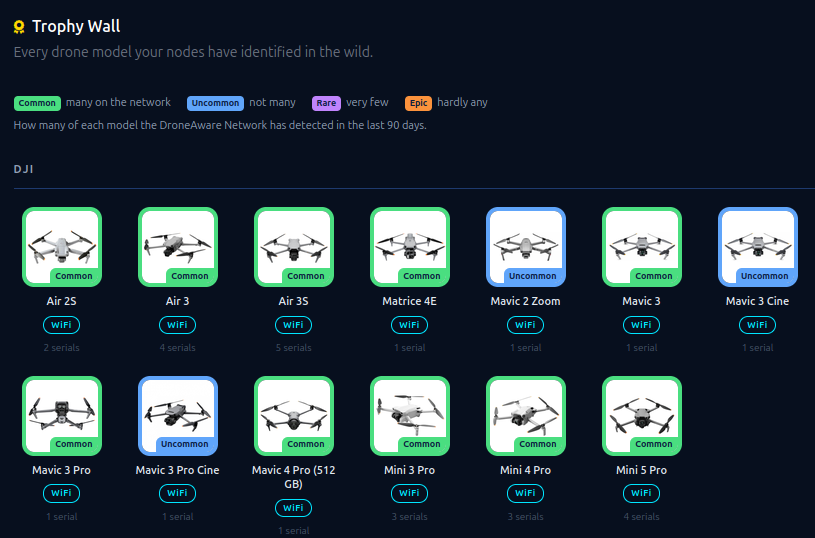
I think I’d get better range if I could get my antenna up a little higher and move them outside (right now they’re just inside against my window), and I’m curious if I’ll be getting more range over the winter, when the nearby trees are all de-leafed (Since “foliage attenuation” is apparently a thing).
It’s fun to see the drones that droneaware catches and it’s so easy to setup, I’d recommend checking it out yourself!
References
Droneaware: https://droneaware.io
Droneaware Code release: https://github.com/fduflyer/DroneAware-Node-Releases
BlueZ: https://bluez.github.io/
Foliage Attenuation: https://ieeexplore.ieee.org/document/5765439